Affiliate disclosure: This article contains a tracked affiliate link to Systeme.io. If you sign up or purchase through it, Hearthloop may earn a commission at no additional cost to you. This does not determine our editorial assessment.
Research checked: 28 November 2026. The steps below are based on Systeme.io’s provider documentation. This is a practical desk-research guide, not a claim that Hearthloop has configured or tested a live funnel.
A lead funnel gives a visitor one clear next step: request a guide, join a mailing list, book a call or enquire about a service. If you are still deciding whether the platform is right for your business, read our Systeme.io review first. Systeme.io combines funnel pages, contact capture and email follow-up, so a small business can build a basic lead-generation path without stitching together several separate services.
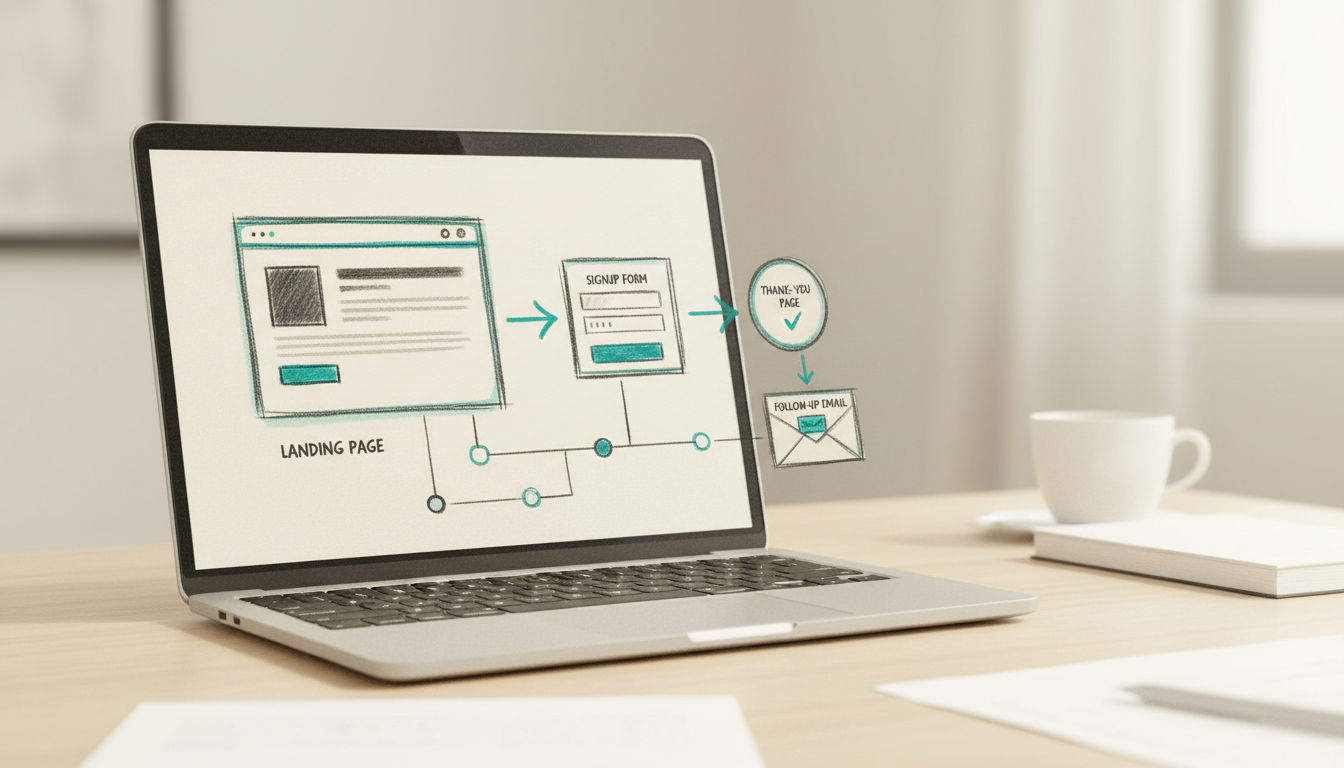
The four-step path
1. Offer
One audience, one clear promise.
2. Opt-in
Explain the benefit and collect needed details.
3. Thank-you
Confirm signup and explain the next step.
4. Follow-up
Deliver what you promised and send relevant follow-up.
What a simple lead funnel should do
- Explain one offer to one target audience.
- Collect only the contact details you genuinely need.
- Tell the visitor what happens after they submit the form.
- Send a relevant confirmation or follow-up email.
- Make it easy to unsubscribe and manage consent.
Step 1: Choose the funnel goal
In the Systeme.io dashboard, open Sites → Sales funnels → Create, name the funnel, choose your domain and select the “Build an Audience” goal for lead collection. The provider says this funnel type creates an Opt-in page followed by a Thank you page. See the official funnel setup guide for current steps.
Build the funnel described in this guide: If you want to test the opt-in page, thank-you page and follow-up workflow in one platform, explore Systeme.io and confirm the current features and plan limits before moving a live campaign.
Step 2: Build the opt-in page
Keep the page focused. Use a headline that states the benefit, a short explanation of what the visitor receives, a simple form and one call to action. Avoid asking for a phone number or other information unless it is needed for the next step.
Step 3: Set up the thank-you page
Confirm that the form was submitted and explain what happens next. If you promised a download or booking link, make it easy to find. Do not imply that a visitor has been subscribed to unrelated marketing unless they gave the required consent.
Step 4: Connect the follow-up
Systeme.io’s help documentation describes an automation rule using the “Funnel step form subscribed” trigger, followed by a “Send email” action. You can also add a tag so new leads can be segmented and receive relevant follow-up. Test the form and email with your own address before sending real traffic.
Optional double opt-in: If you want contacts to confirm their subscription before receiving automation emails, enable double opt-in in the form settings and test the confirmation email. Systeme.io’s double opt-in guide explains the per-form setup and confirmation flow.
If you want a multi-message onboarding series rather than one confirmation email, follow our step-by-step Systeme.io welcome email sequence guide.
Step 5: Test the full journey
- Submit the form on desktop and mobile.
- Check that the contact appears in the account.
- Confirm the correct tag or automation runs.
- Check the confirmation email, sender details and unsubscribe link.
- Test the thank-you page and every download or booking link.
- Review the page for clear consent wording and an accessible privacy notice.
Common mistakes to avoid
- Offering several competing calls to action on one page.
- Collecting unnecessary personal information.
- Sending promotional email without appropriate consent.
- Failing to test automations before a campaign goes live.
- Driving paid traffic to a page before checking mobile layout and load behaviour.
Is Systeme.io suitable for this?
It is worth evaluating if you want a basic opt-in page, contact list and automated email follow-up in one platform. To check which subscription tier supports your contact and automation needs, see our Systeme.io pricing guide. If your business needs advanced CRM permissions, complex analytics or highly specialised integrations, compare dedicated alternatives before moving an established process.
Explore the platform: Visit Systeme.io and review its current capabilities. For the exact setup sequence, see the provider’s funnel creation guide and automatic lead email guide.
Research note: The steps above are based on provider documentation. Menu labels and features may change; check the current interface before implementation.
Leave a Reply